AI automation for businesses: real examples

I design AI-assisted business workflows that give your team time back. Here are three real systems I created for my clients to remove repetitive work.

Built with Claude CodeMakeZapiern8nHermes

What I built and tested

Three practical AI automations

These workflows help teams save time, work more efficiently and focus on higher-value tasks.

AI handles the repetitive steps, while people stay in control of the decisions.

01Cold email outreach and lead generation

Personalised cold emails ready to review, without hours of lead research

The workflow researches and scores each lead, drafts the email and logs it. Nothing sends until a person approves it.

The problem

Businesses spend time and money finding potential customers, but what happens to those leads afterwards?

Too often, they end up sitting in spreadsheets or CRM systems because researching each company, deciding who to prioritise and preparing personalised outreach takes too much time.

The result? Potential business opportunities get overlooked, and promising leads never receive the attention they deserve.

Before

A growing list of potential customers, but no efficient way to research and prioritise them.

Every new lead requires manual research, checking company information and writing emails from scratch. Opportunities can be missed simply because the team doesn’t have enough time to do outreach at scale and follow up.

After

An AI workflow researches each lead, evaluates how well they fit your ideal customer profile and prepares personalised emails based on relevant company information.

The research, lead scores and outreach drafts are organised automatically, giving your team everything it needs to review prospects and take the next step.

Real business result

A CEO booked meetings with potential clients using this AI-powered outreach system.

The value goes beyond saving hours on manual research. It’s about making better use of the leads you already have, identifying relevant opportunities and turning that information into sales conversations.

Human oversightAll emails are reviewed and approved before being sent.
A new lead lands in the list

You may only have a company name or a basic contact.

The workflow researches and scores the lead

It checks fit, context and relevant signals. Your team does not start from an empty page.

The workflow drafts a personalised email

The message uses the company’s context. It is not a generic template.

You review the draft

The system never sends on its own. A person checks the research, tone and relevance first.

The workflow logs the lead

The database or CRM stays up to date without more manual copying.
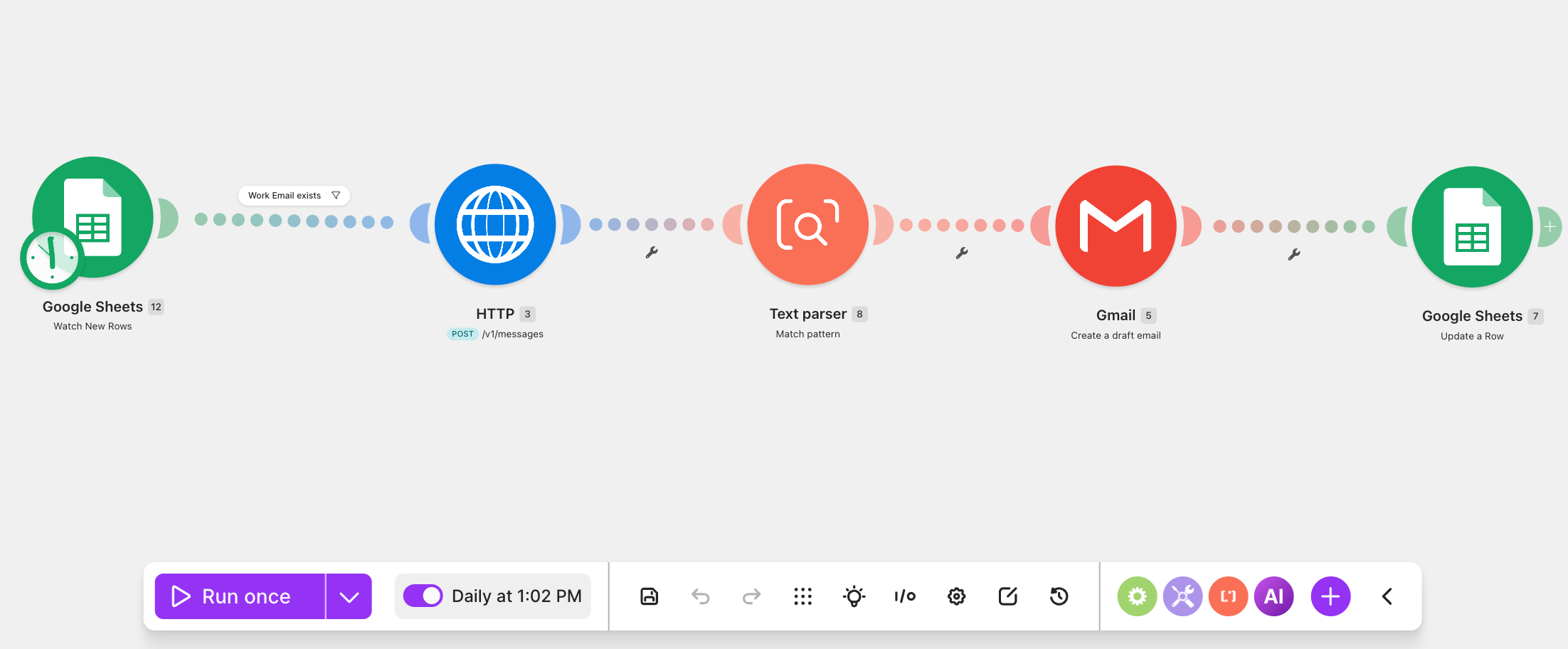
Outreach and lead-scoring automation, built in Make A real outreach workflow built in Make
02Marketing operations and internal systems

An AI assistant that turns incoming emails into assigned tasks

Requests stop getting buried. The assistant spots the real ones, creates the task and sends it to the right person.

Before

Someone had to read every email, spot the requests, copy the details into the project management tool, write the task and assign it. If that did not happen or someone missed an email, the request stayed buried in the inbox.

After

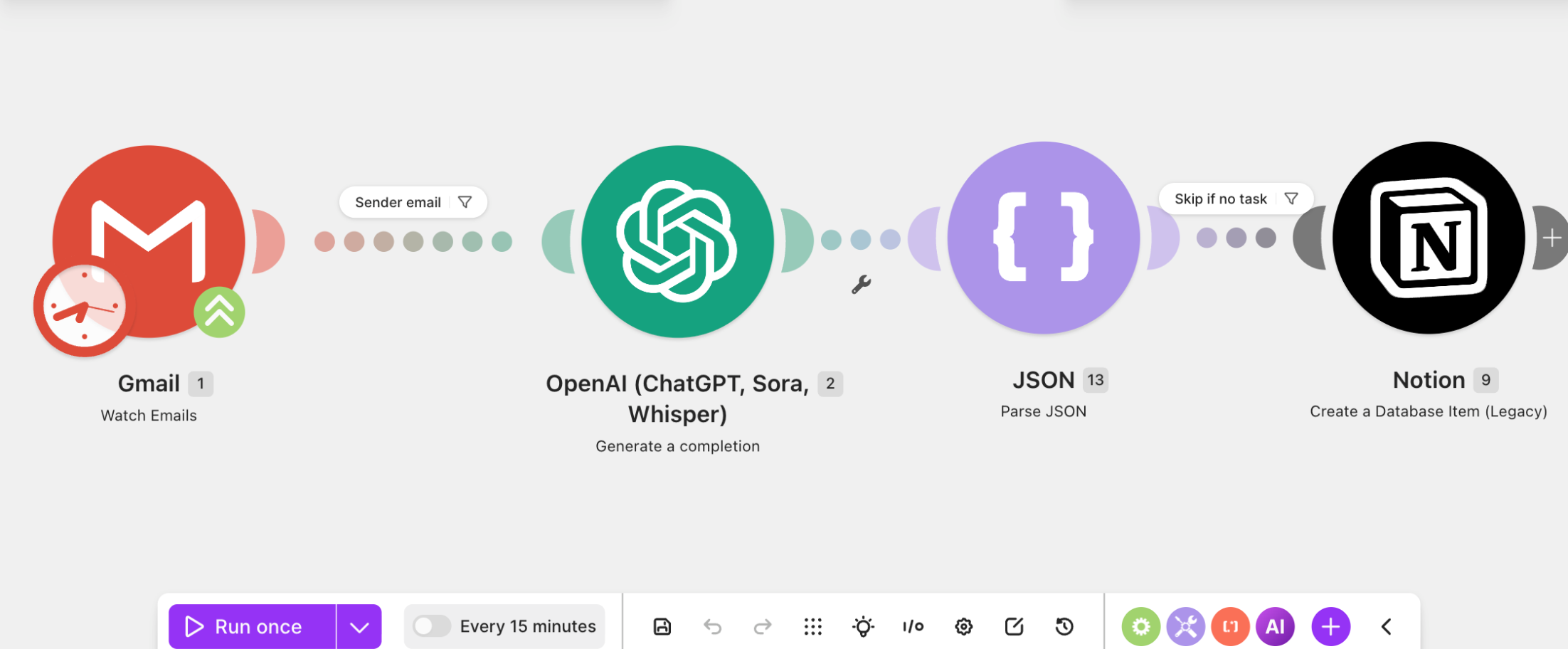
The AI automation reads incoming emails and spots the real requests. It creates the task in Asana, Notion or ClickUp with the key details and assigns it to the right person or team.

Business value

Fewer requests sit unnoticed in inboxes. Managers see more clearly what work is coming in. An AI assistant supports their daily business operations.

Control pointThe automation ignores messages with no real action, so the task board stays free of noise.
A client, provider or colleague sends an email

The request starts where work often starts: inside an inbox.

The assistant checks your inbox on a schedule

It reads the relevant conversations, so nobody has to sort through the inbox first.

It decides whether there is a real task

It skips messages without an actionable request, so the task board stays tidy.

It creates and assigns the task

The request becomes a clear task in your project management platform. It goes to the right person or team.

Inbox-to-task automation, built in Make A real inbox-to-task workflow built in Make

Recognise this in your own team? Let’s look at where the hours go.

Book a call

03Automated market research and company profiles

Company research and lead qualification in minutes with Claude Code

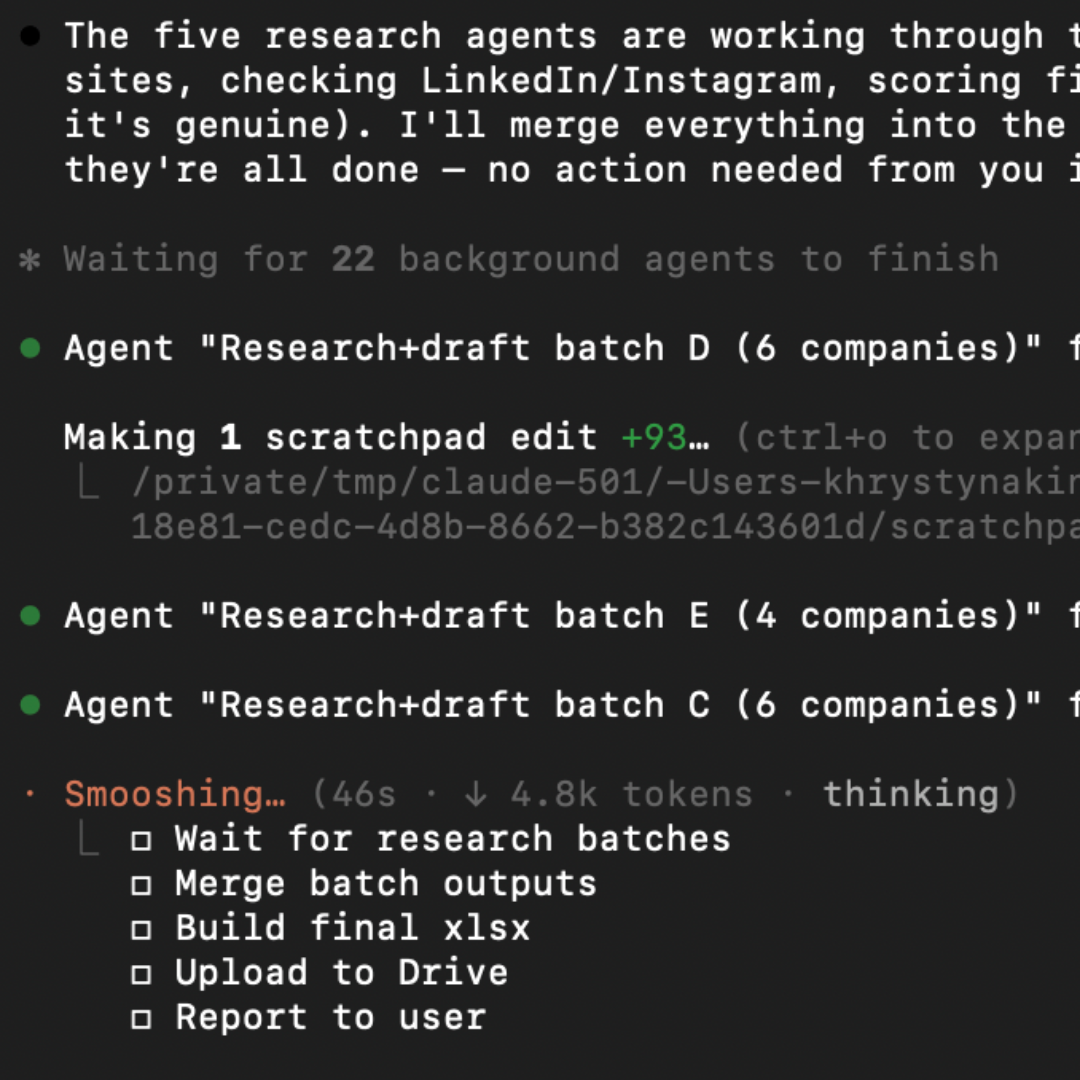
Parallel research agents work through a target list against shared criteria and merge the findings into one report automatically uploaded to Google Drive or your CRM.

Scope50companies researched
Automated~10 minfor the whole run
By handDaysfor the same work

Documented run

The workflow researched 50 companies in approximately 10 minutes. That work previously took days.

Control pointThe workflow uploads the report for human review before anything moves into an outbound process.

Before

Researching dozens of companies by hand took days. The comparisons came out inconsistent.

After

An AI workflow sent multiple research agents through batches of companies against shared criteria. It then merged the findings into one structured report.

Business value

Leadership gets a faster first view of a market or prospect set. The team spends its time validating findings, not collecting first-pass signals.

The workflow splits target companies into research batches

Each batch gets the same criteria and output requirements.

Multiple agents research in parallel

They review company websites, LinkedIn, Instagram, public activity and fit signals.

The workflow scores and merges the results

It brings the separate findings together in one structured report.

The workflow uploads the report for review

A human checks the research before it moves into any outbound process.

Claude Code running 22 parallel research agents An actual research run using Claude Code

Want results like these for your team? Tell me what you do by hand today.

Discuss your workflow

What changed for the business

The visible change is speed. The bigger change is better use of attention

Senior people no longer have to be the glue between every inbox, spreadsheet and research tab. The workflow does the first pass. A person steps in to approve.

Capacity

More time for selling, advising, creating and looking after relationships.

Speed

Less waiting between something coming in and a clear next step.

Consistency

Every lead, email and company gets checked the same way.

Control

You can see what the workflow did and where the information came from. You also see where a person steps in.

AI automation case study

How I start

Before choosing a tool, I map the process

Where does your team lose time every week copying, checking or chasing information by hand? That is where I start. Then I design and build a workflow around that specific problem.

  • Where does the information come from?
  • Who needs to use it next?
  • What keeps getting repeated?
  • Where do errors or delays appear?
  • Which decisions still need a person?
The result is not another generic AI tool sitting beside your existing systems. It is a practical process that connects the tools your team already uses. A person joins the workflow when judgment matters.

Not sure where to start? Tell me what your team keeps repeating and we will map it together.

Book a workflow review

Is this relevant to your business?

What people ask before working with me

We lose afternoons to research before every sales call. What comes off our plate?

The first pass. The workflow researches and scores companies against your criteria. Your team starts from a structured report, not a blank page. In one documented run, it researched 50 companies in about 10 minutes instead of days. A person still reviews the findings.

Our tools aren’t connected, so someone spends half a day copying and pasting information between tools. Can you fix that without replacing anything?

Usually, yes. I build around the tools your team already uses. That can be Google Workspace or Microsoft 365, Gmail or Outlook, Slack or Teams, HubSpot or another CRM, and project boards such as Asana, Notion, ClickUp or Monday. The workflow connects them through Make, n8n or Zapier, so information moves between them without anyone copying it across. Nothing gets replaced, and your team keeps working where it already works.

Requests land in our company inbox and it takes us a long time to classify and route them manually. What can we automate?

The inbox assistant reads incoming email and spots the real requests. It creates the task and routes it to the right person or team. It leaves emails with no action alone, so the task board stays clean.

The same weekly checks eat my team’s time. How do you decide what to automate?

I map the process first. Where does the information come from? Who needs it next? What keeps repeating? Where do errors or delays appear? Then I automate only the part that repeats. A person keeps the judgement calls.

What stops an AI workflow from sending something wrong to a client or prospect?

A person stays in the loop wherever judgement matters. The workflow drafts outreach for you to review and never sends on its own. It logs every step, so you see what it did and where the information came from.

What does it cost to get started?

Automation starts from €499. Custom pricing depends on the complexity of the workflow.

What is costing your team time every week?

The goal is not to automate everything. It is to remove unnecessary repetition so your team can focus on better work.